
Use Calculations in Coggle
✨new✨ – this is a new feature, we really appreciate your feedback at hello@coggle.it!
Calculations allow you to perform mathematical operations, such as adding up numbers in the branches of your Coggle diagrams. This uses a special syntax starting with = for each calculation: very similar to the way that formulae work in Microsoft excel spreadsheets.
Calculations can use mathematical operations like + , - , * , and / , and can reference special variables and functions.
There are two ways to start a formula in Coggle. Either start a line with the equals sign, and then the whole line will be treated as a formula:
= 1 + 2 + 3

Or, use equals immediately followed by an opening bracket, to put a formula anywhere in a line of text:
The answer is =(6 * 7).

💡Tip: If you to write text that uses this syntax without turning it into a calculation, then put a slash before the equals sign to escape it, like this: \= .
Reference other Items
Calculations are very powerful, and can refer to the results of other calculations. This means that you can have a branch that adds up its child branches:
Apples total =(SUM(CHILDREN))

Or adds up all the leaves of the current item (the connected items at any depth that have no children of their own), to give totals or sub-totals, for example to create a budget or track expenses:
Library =(SUM(LEAVES)) bananas/week

Numbers that you write are only included in total if they are themselves a calculation, so to include a number just start it with the = or =(...) syntax:
Monday =(8) bananas
Named Variables
You can give the result of a calculation a name, which you can then refer to in other calculations. Names must be all UPPERCASE, and should occur immediately before the =(...) for inline calculations:
Total APPLES=(SUM(CHILDREN))
And for calculations at the start of a line, the variable must be the only word before =
BANANAS = SUM(LEAVES)
Then you can use the variables in any other calculation:
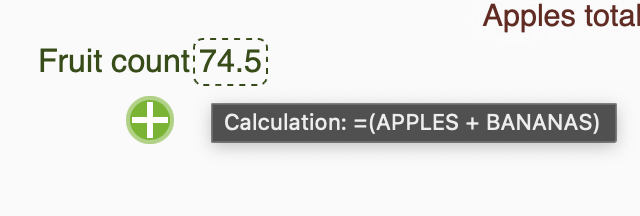
This is just the start of what you can do with calculations! View or create your own copy of the mind map with the calculations from this article here, or view the full list of supported functions and variables you can use.
Please let us know any feedback or suggestions you have about this feature at hello@coggle.it!